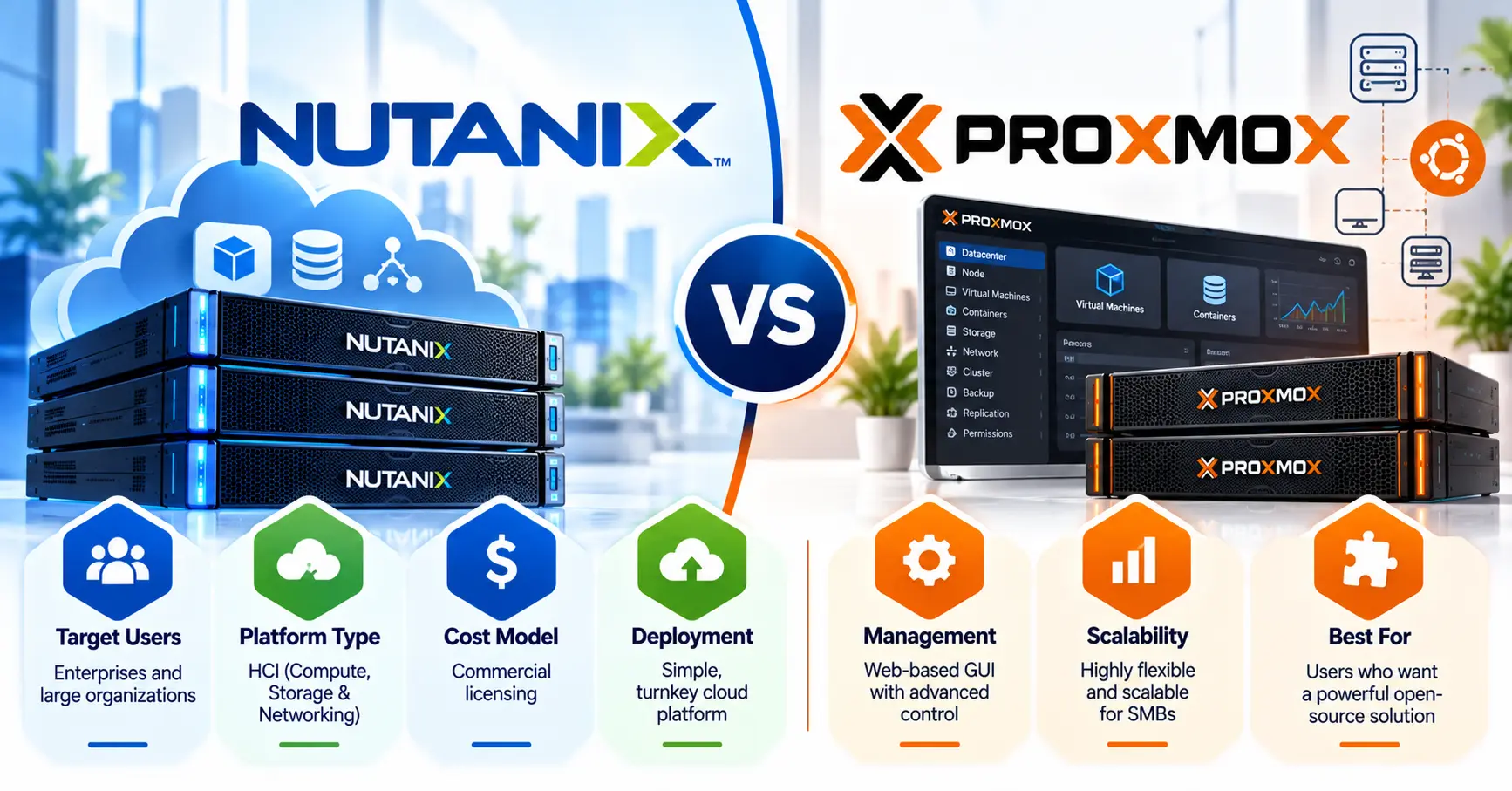
Nutanix is a commercial, turnkey hyperconverged platform (AHV hypervisor, AOS storage, Prism management) licensed per CPU core. Proxmox VE is a free, open-source KVM and LXC platform where you choose the storage and pay only for optional per-socket support. Pick Nutanix when you want one vendor to own the entire stack. Pick Proxmox when your team has Linux skills and licensing cost is the deciding factor.
How we built this Nutanix vs Proxmox review: every price, version, and limit below was checked against vendor documentation, release notes, and SEC filings in October 2026. The cost model, core-count chart, and job-posting counts are our own analysis, dated so you can re-check them.
What Is the Difference Between Nutanix and Proxmox?
The core difference is ownership. Nutanix sells an integrated platform where storage, hypervisor and management are engineered and supported as one product. Proxmox gives you a free hypervisor and management layer, and you assemble storage, backup and networking from open components.
| Nutanix (NCI) | Proxmox VE 9.2 | |
|---|---|---|
| What you get | AHV hypervisor, AOS distributed storage and Prism management as one licensed stack | Free hypervisor plus web management; storage and backup are your design choices |
| Hypervisor | AHV, built on KVM | KVM for virtual machines, LXC for containers |
| Licensing unit | Per physical CPU core, 1 to 5 year terms; Starter edition capped at 12 nodes (Nutanix software options) | Per occupied CPU socket, per year; every feature included at every level |
| Public on-premises price | None; quote only | Yes; see the tier table below |
| Multi-cluster management | Prism Central | Proxmox Datacenter Manager |
| Free edition | Community Edition, for learning only | The full product |
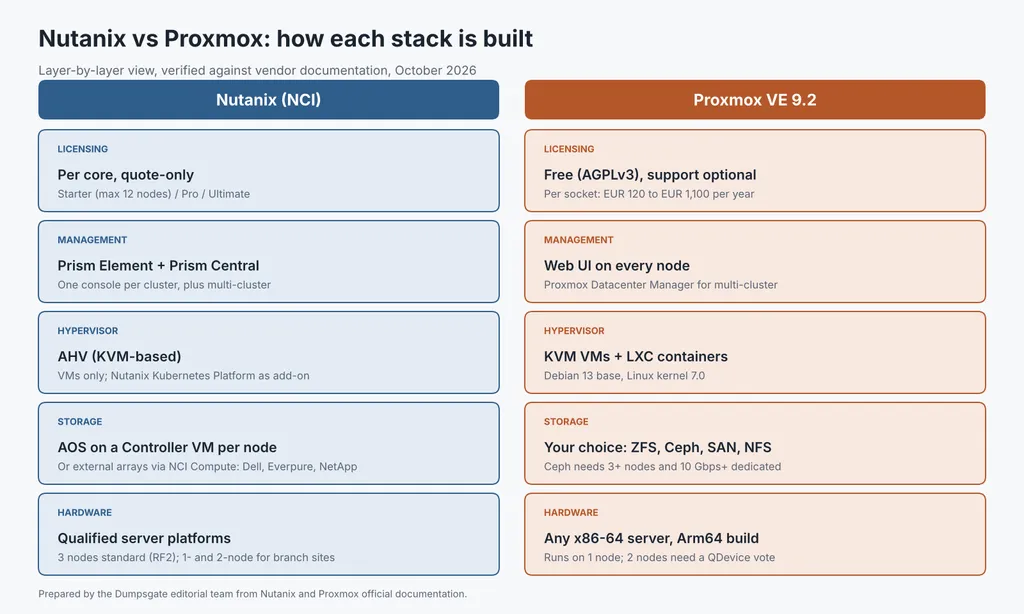
Original diagram by Dumpsgate: how each stack is built, layer by layer.
Nutanix AHV vs Proxmox: Is the Hypervisor Actually Different?
Not at the core. AHV and Proxmox VE both run virtual machines on KVM, the Linux kernel hypervisor, so the Nutanix hypervisor vs Proxmox question is really about the layers above it: storage, management and support.
This also clears up the common “Nutanix vs Proxmox vs AHV” search. AHV is not a third product; it is the hypervisor inside Nutanix, and it is not sold separately from Nutanix Cloud Infrastructure (NCI) licensing.
Two practical differences remain:
- Containers: Proxmox runs LXC system containers next to VMs on the same host. Nutanix handles containers through its separately licensed Kubernetes platform.
- Day-to-day management: Prism automates placement, upgrades and health checks across the stack. Proxmox exposes the same tasks through its web UI, CLI and REST API, which suits teams that script their infrastructure.
Learn More About: Nutanix vs VMware: 7 Differences, From 300,000 vs 32,360 Customers to $250 vs $200 Exams
How Much Does Nutanix vs Proxmox Cost for a 3-Node Cluster?
Proxmox’s software cost for a typical 3-node cluster ranges from €0 to €6,600 per year. Nutanix publishes no on-premises price, and its only public per-core rate works out to roughly $175,000 per year for the same cluster. That gap is the real story behind the Nutanix vs Proxmox cost question, so here is the math.
What do Proxmox subscriptions cost in 2026?
| Proxmox VE tier | Price per socket per year | Support tickets | Critical response time | Support hours |
|---|---|---|---|---|
| Community | €120 | None (forum only) | Not included | Not included |
| Basic | €370 | 3 per year | 1 business day | Business hours |
| Standard | €550 | 10 per year | 4 hours | 24/7 by end of 2026 |
| Premium | €1,100 | Unlimited | 2 hours | 24/7 since October 19, 2026 |
Source: Proxmox VE subscription pricing. Every node in a cluster must carry the same tier, and Community is intended for non-production use.
What does a 3-node cluster cost on each platform?
Model cluster: 3 hosts × 2 sockets × 32 cores = 6 sockets and 192 physical cores. Software only; hardware, backup and staff are excluded.
| Platform | How it is counted | Calculation | Software cost |
|---|---|---|---|
| Proxmox VE, no subscription | Not counted | Free under AGPLv3 | €0 per year |
| Proxmox VE Basic | 6 sockets | 6 × €370 | €2,220 per year |
| Proxmox VE Standard | 6 sockets | 6 × €550 | €3,300 per year |
| Proxmox VE Premium | 6 sockets | 6 × €1,100 | €6,600 per year |
| Nutanix NCI Pro, public list rate | 192 cores | 192 × $0.104 per core-hour × 8,760 hours | $174,920 per year |
| Nutanix NCI, on-premises term license | 192 cores | Quote only | Not published |
| Hyper-V (Windows Server 2025 Datacenter) | 12 packs of 16 cores | 12 × $6,771 | $81,252 one-time, plus CALs |
| VMware VCF or VVF | 192 cores | Quote only | Not published |
Sources: Nutanix’s $0.104 per core-hour NCI Pro rate covers Nutanix software only on public cloud bare metal. It is the only per-core price Nutanix publishes, so treat it as a reference point, not an on-premises quote. Microsoft lists Datacenter at a suggested $6,771 per 16 core licenses, with unlimited VMs per licensed host.
Read More: Nutanix Benefits Most Guides Skip: 7 Career Wins and the $175K Pay Data
Why does CPU core count change the answer?
Proxmox charges per socket, so denser CPUs cost nothing extra. Nutanix, VMware and Hyper-V charge per core, so the bill rises with every core you add.
| Cores per socket (3 hosts, 2 sockets each) | Licensed cores | Proxmox Standard | Nutanix public rate | Hyper-V Datacenter |
|---|---|---|---|---|
| 16 | 96 | €3,300 | $87,460 | $40,626 |
| 32 | 192 | €3,300 | $174,920 | $81,252 |
| 64 | 384 | €3,300 | $349,839 | $162,504 |
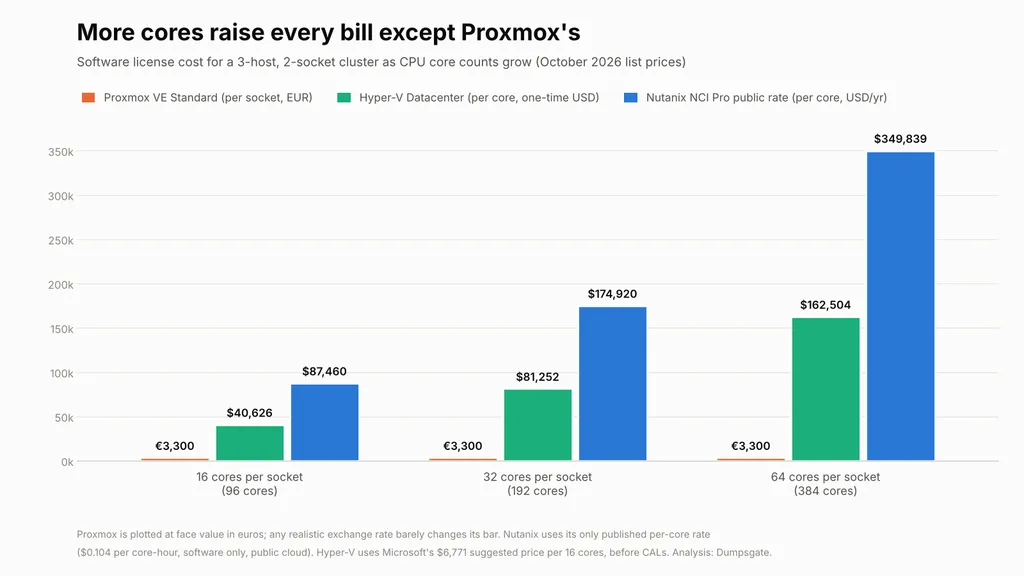
Original chart by Dumpsgate, built from the published prices above.
If you plan to consolidate onto 64-core or larger CPUs, this table matters more than any feature list. On the other hand, Proxmox’s low software cost shifts spending to people: someone on your team must own Ceph, networking, patching and backup design.
What Changed in 2027 That Older Comparisons Still Miss?
Several claims that still appear in search results and AI summaries are now outdated. Here is what is true as of October 2026.
| Outdated claim | Current fact |
|---|---|
| “Nutanix requires hyperconverged storage.” | NCI now runs on external arrays from Dell, Everpure and NetApp. This compute-only license must cover every core in the cluster. |
| “Nutanix needs at least three nodes.” | Three nodes is the standard minimum, but Nutanix also offers single-node and two-node clusters for branch offices and backup sites. |
| “Proxmox support is business hours only.” | Premium includes 24/7 support, and Standard follows by the end of 2026 (see the tier table above). |
| “Proxmox has no automatic load balancing.” | Proxmox VE 9.2 (May 21, 2026) added a Dynamic Load Balancer that automatically migrates HA-managed guests to even out node load. Guests outside HA are not moved. |
| “Proxmox lacks central multi-cluster management.” | Proxmox Datacenter Manager 1.0 shipped December 4, 2025, with cross-cluster live migration. |
| “Proxmox runs on x86 only.” | An official Arm64 build of Proxmox VE 9.2 is available. |
Nutanix’s momentum is real too. Its fiscal 2026 results report $2.85 billion in revenue, more than 3,000 new customers and general availability of Dell PowerStore support in NCI 7.6.
Ceph vs Nutanix: How Does the Storage Layer Compare?
Ceph is the usual Proxmox answer to Nutanix’s built-in distributed storage. Both pool local disks across nodes, but Ceph puts the design and tuning work on you.
| Ceph on Proxmox VE | Nutanix AOS | |
|---|---|---|
| Minimum nodes | 3 servers, preferably identical | 3 for a standard cluster |
| Default data protection | 3 replicas; I/O continues with 2 | Replication factor 2, or 3 on Pro and Ultimate |
| Network | At least 10 Gbps dedicated to Ceph; 25 Gbps or more for NVMe | Defined by Nutanix’s qualified hardware designs |
| Resource overhead | At least 8 GiB RAM recommended per OSD (one OSD per disk) | A Controller VM on every node |
| Data efficiency | Erasure-coded pools; FastEC in Ceph Tentacle speeds up small random I/O | Compression, deduplication and erasure coding, depending on edition |
| Who tunes it | Your team | Nutanix software, automatically |
Sources: Ceph column from the Proxmox VE Ceph documentation; Nutanix column from the Nutanix edition table linked earlier.
The verdict on Ceph vs Nutanix storage: Ceph can match Nutanix on resilience when it is built to these recommendations, but storage is where Proxmox demands the most specialist skill. If nobody on your team wants to own Ceph, either budget for Nutanix or run Proxmox on an existing SAN.
Nutanix CE vs Proxmox: Which Is Better for a Home Lab?
For most home labs, Proxmox wins; Nutanix Community Edition (CE) wins only if you are studying for a Nutanix certification. In the Nutanix Community vs Proxmox comparison, both are free, but CE has stricter rules.
| Nutanix CE | Proxmox VE | |
|---|---|---|
| Intended use | Learning and testing, not production | Same build that runs in production |
| Supported cluster sizes | 1, 3 or 4 nodes; a single-node cluster cannot be expanded later | 1 node and up |
| CPU | At least 4 cores, 2 of them reserved for the Controller VM; Intel E-cores not supported | Any 64-bit x86 or Arm64 CPU with virtualization support |
| Memory | 32 GB minimum; 64 GB recommended for deduplication and compression | Runs on modest hardware |
| Disks | At least 3: a 32 GB boot device, a 200 GB SSD, and 500 GB or more for data | A single disk works |
| Internet requirement | Permanent; if the connection drops for an extended period, the cluster keeps running, but the Prism console locks you out | None |
| Career value | Hands-on practice for Nutanix certification | Builds Linux, KVM, and Ceph skills |
Sources: Nutanix CE 2.1 documentation on recommended hardware and licensing requirements.
Which skill do more US employers ask for?
Nutanix, by a wide margin. In October, 2026, an exact-phrase Indeed search limited to the United States returned about 700 job postings mentioning “Nutanix” and about 300 mentioning “Proxmox”.
| Search term (Indeed, United States) | Job postings |
|---|---|
| “Nutanix” | About 700 |
| “Proxmox” | About 300 |
Dumpsgate search, October 29, 2026. Indeed rounds these totals, and a posting counts if it mentions the term anywhere, so treat them as a demand signal rather than a headcount.
Nutanix skills appear in more than twice as many listings, which makes CE practice worth the extra hardware if a virtualization job is your goal.
How Do Nutanix vs VMware vs Proxmox vs Hyper-V Compare?
Most buyers comparing Nutanix vs Proxmox vs VMware are leaving Broadcom’s per-core subscriptions. Here is how all four platforms line up.
| Nutanix | Proxmox VE | VMware (VCF or VVF) | Hyper-V | |
|---|---|---|---|---|
| License unit | Per core, subscription | Per socket, optional | Per core, subscription; minimum 16 cores per CPU | Per core in 16-core packs, perpetual |
| Built-in shared storage | AOS, or external arrays | Ceph or ZFS replication | vSAN | Storage Spaces Direct |
| Containers | Kubernetes platform add-on | LXC built-in | Kubernetes in VCF | Windows containers |
| Best fit | Teams wanting a supported, VMware-like operating model | Linux-skilled, cost-sensitive teams | Large estates already standardized on VMware | Windows-first shops |
Two short answers for related searches:
- Nutanix vs VMware: both are per-core subscriptions with one-vendor support. Nutanix is usually the closer like-for-like replacement for teams leaving VMware, because Prism and Move reduce operational change.
- Nutanix vs Hyper-V: Hyper-V costs less up front for Windows-heavy estates that already own Datacenter licenses. Nutanix offers a more integrated storage and management layer.
The Nutanix vs VMware vs Proxmox decision usually comes down to the license unit in the first row.
How Hard Is It to Migrate From VMware to Nutanix or Proxmox?
Both platforms have a built-in migration path from VMware, with different levels of automation.
- To Nutanix: Nutanix Move migrates VMs from vSphere, Hyper-V and AWS, pre-seeds data ahead of cutover and lets you test workloads before switching.
- To Proxmox: the built-in import wizard pulls VMs directly from ESXi 6.5 through 8.0. Disks stored on vSAN cannot be imported directly, and Windows VMs need VirtIO driver steps.
- From Nutanix to Proxmox later: Proxmox’s importer supports ESXi and OVF/OVA sources but has no dedicated AHV connector. Plan to export AHV disks and bring them in with Proxmox’s disk import command.
Read More: Nutanix Certification Cost 26-27: $100- $300 + Free Vouchers?
What Mistakes Do Teams Make When Choosing Between Nutanix and Proxmox?
- Running Nutanix CE in production. It is a learning edition with no vendor support, and losing internet access eventually locks you out of Prism.
- Comparing prices without counting cores. A Proxmox per-socket quote and a Nutanix per-core quote are not comparable until you multiply by your real core count.
- Building Ceph on 1 GbE or behind RAID controllers. Proxmox’s own documentation recommends dedicated 10 Gbps networking and plain HBAs.
- Mixing Proxmox subscription tiers in one cluster. Every node must carry the same level.
- Running a 2-node Proxmox cluster without a QDevice. Two nodes cannot keep quorum alone; an external vote is required.
- Buying Nutanix Starter for a cluster that will grow. Starter stops at 12 nodes, and moving up a tier later requires an upgrade license.
- Assuming the Proxmox load balancer covers every VM. It only moves HA-managed guests.
The Verdict: Should You Choose Nutanix or Proxmox?
Choose based on who will run the platform at 3 a.m., not on feature checklists.
| If this describes your situation | Choose | Why |
|---|---|---|
| No in-house Linux or storage specialists, and you need one vendor accountable for everything | Nutanix NCI Pro or Ultimate | You are paying for an operating model, not just a hypervisor |
| You already own Dell, Everpure or NetApp arrays and want a VMware-like experience | Nutanix NCI with external storage | Reuses your storage investment and avoids a storage redesign |
| You have Linux skills, dense CPUs and real budget pressure | Proxmox VE with a Standard or Premium subscription | Per-socket pricing stays flat as cores grow |
| You run a single server or a small edge site | Proxmox VE | Full features on one node at no license cost |
| You are building a home lab for your career | Proxmox day to day, Nutanix CE for certification prep | Learn the open-source stack, then practice on Nutanix before the exam |
Our recommendation for most mid-sized teams in 2026: if at least two engineers on your team are comfortable with Linux and Ceph, start a Proxmox pilot on three nodes with a Standard subscription. If not, request a Nutanix quote based on your real core count and compare it against the core-density table above.
Planning the skills side of your move? Browse our cloud computing guides for certification paths that match the platform you choose.
Frequently Asked Questions
Is Nutanix AHV free?
No. AHV is included with Nutanix Cloud Infrastructure licensing and is not sold separately. The only free way to run it is Community Edition, which is limited to non-production use.
Is Proxmox really free for commercial use?
Yes. Proxmox VE is licensed under the GNU AGPLv3, and every feature works without a subscription. A paid subscription adds the tested enterprise repository and vendor support.
Which is better for a small business with one server?
Proxmox. It runs fully on a single node with ZFS for local resilience. Nutanix single-node clusters exist, but they target branch offices and backup sites and offer no node-level redundancy.
Do Nutanix and Proxmox support GPU workloads?
Yes. Nutanix NCI supports vGPU and GPU passthrough, and Proxmox VE supports NVIDIA vGPU and PCIe passthrough. Check each vendor’s hardware compatibility list for your specific GPU model.
Which certification fits each platform?
Nutanix offers a formal certification track, such as Nutanix Certified Professional, Multicloud Infrastructure (NCP-MCI), and Community Edition is the usual practice lab. Proxmox runs official training courses, and because the platform is built on Debian, KVM and Ceph, a Linux credential is the most portable proof of those skills. Red Hat’s RHCSA is the most widely recognized, and CompTIA Linux+ is the vendor-neutral alternative.